Why bother reading this paper?
Because almost every distributed system you use today — S3, HDFS, Azure Blob — traces its lineage back to this paper. Google published it in 2003 and it quietly shaped how the entire industry thinks about storing data at scale.
Also, it is a surprisingly easy read for a systems paper. No insane math. Just good engineering reasoning.
The Assumptions
Before getting into what GFS does, you need to understand why it looks the way it does. Google didn’t build GFS by following some textbook. They built it around the reality of running thousands of commodity machines.
Their core assumptions were:
Component failures are the norm, not the exception. When you have thousands of machines, something is always broken. A disk fails here, a NIC goes bad there, someone trips over a power cable. GFS was designed assuming this is constant background noise.
Files are huge. Not “a few MBs” huge. We’re talking multi-GB files containing millions of objects. Optimizing for millions of tiny files was not their concern.
Most writes are appends, not overwrites. Once a file is written, it’s almost never modified in the middle. This is a massive departure from how POSIX filesystems work and GFS exploits this heavily.
Workloads are mostly sequential reads, not random. Streaming through a large dataset is way more common than seeking to some random offset.
These assumptions dictate basically every design decision that follows. Keep them in mind.
The Architecture
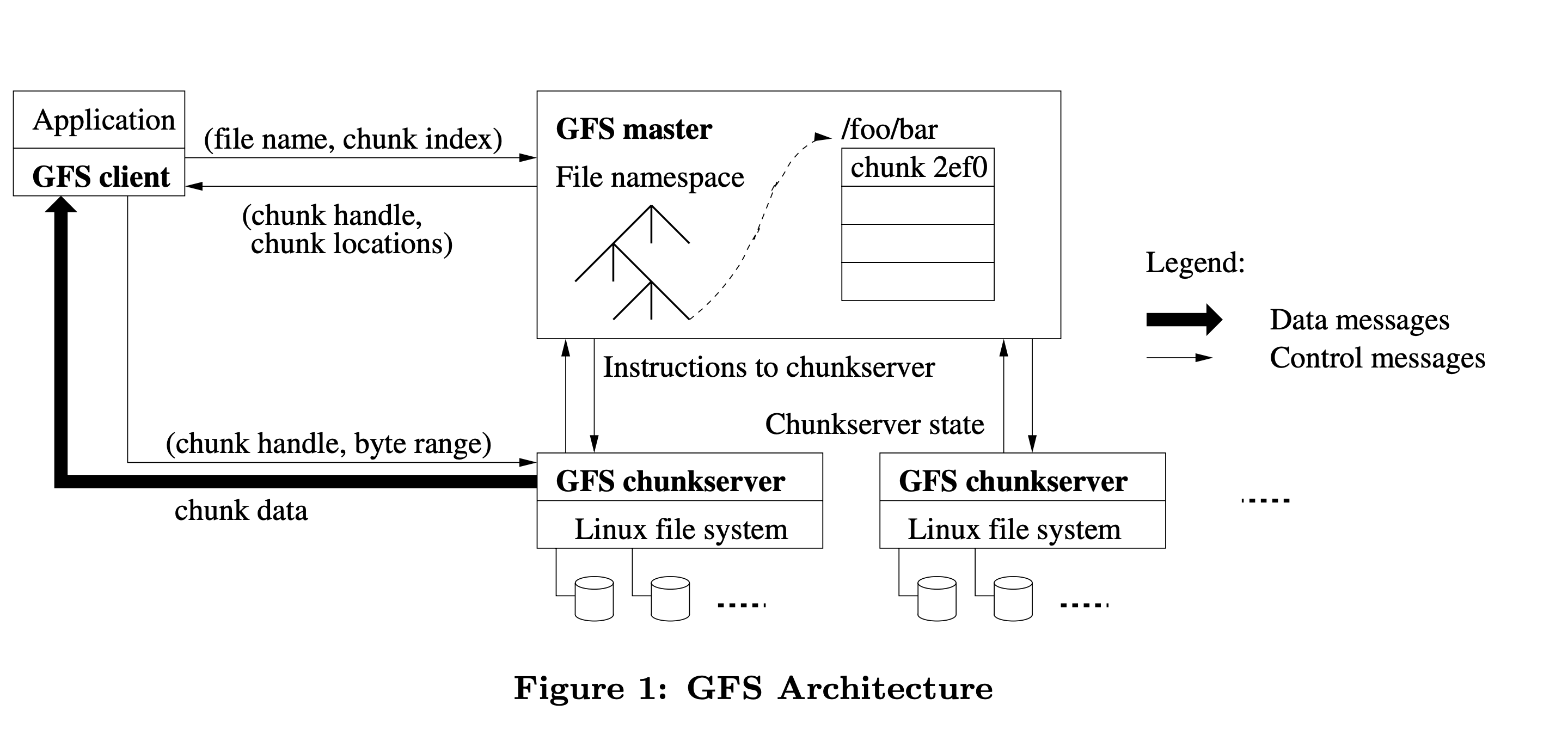
GFS has three components: a Master, ChunkServers, and Clients.
Chunks
Files are split into fixed-size chunks of 64MB each. Each chunk gets a globally unique 64-bit identifier (called chunk handle) assigned by the master at creation time.
Each chunk is replicated across 3 ChunkServers by default (you can configure this). So if one server dies, you have 2 more copies sitting elsewhere.
Why 64MB? That’s actually pretty large for a chunk size. The reasoning is: with huge sequential files, large chunks mean fewer metadata entries on the master and fewer interactions with the master during a read. The tradeoff is wasted space for small files, but remember — they decided small files are not their problem. Additionally, lazy allocation avoids wasting space due to internal fragmentation.
The Master
The master is a single node (yes, single) that stores all the filesystem metadata:
- The namespace (directory tree)
- File-to-chunk mappings
- Chunk locations (which ChunkServers hold which chunks)
All metadata lives in the master’s memory for fast access. The namespace and file-to-chunk mappings are also persisted to an operation log on disk (and replicated to remote machines). Chunk locations are not persisted — the master just asks ChunkServers for their chunk lists at startup. This avoids the headache of keeping chunk location state consistent across master restarts.
“But wait, a single master? Isn’t that a single point of failure?”
Yes. But Google made a deliberate call here: a single master makes reasoning about consistency way simpler. The trick is keeping the master out of the hot data path so it doesn’t become a bottleneck. Clients talk to the master only to figure out where data lives, then communicate directly with ChunkServers. For large sequential reads, you might touch the master once and then stream gigabytes directly from ChunkServers without involving it again.
The master also has a shadow master setup for read availability during failures. But there’s only ever one primary master making authoritative decisions.
ChunkServers
Just Linux machines storing chunks as plain files on local disks. They don’t know anything about GFS files or directories — just chunk handles and byte ranges. The master tells them what to do.
How a Read Works
- Client figures out which chunk index contains the byte offset it wants.
- Client asks the master: “Give me the chunk handle and ChunkServer locations for file X, chunk index N.”
- Master responds. Client caches this info.
- Client picks the closest ChunkServer and reads directly from it. Master is completely out of the picture from here.
Simple. The caching in step 3 means the client rarely has to bother the master for the same file.
How a Write Works
Writes are more involved, especially because multiple clients might be writing to the same file concurrently.
GFS uses a lease mechanism. The master grants one ChunkServer a lease to be the primary replica for a chunk. The primary is responsible for ordering mutations to that chunk. Leases last 60 seconds and can be renewed.
When a client wants to write:
- Client asks the master which ChunkServer holds the primary lease for the chunk.
- Master responds with primary + secondary replica locations.
- Data is pushed to all replicas (not just the primary) using a chained pipeline. Each ChunkServer forwards the data to the next one in the chain. This decouples data flow from control flow and uses network bandwidth efficiently.
- Once all replicas have buffered the data, the client sends a write request to the primary.
- The primary picks a serial order for all mutations it has received and applies them.
- Primary forwards the write request (with the serial order) to secondaries. Secondaries apply in the same order.
- Secondaries acknowledge the primary. Primary replies success to the client.
If any secondary fails mid-way, the client retries. This can result in some replicas having the data and others not — which brings us to the consistency model.
The Consistency Model
This is the part most people gloss over but it’s actually the most important for understanding what GFS is and isn’t.
GFS makes a distinction between two states a file region can be in after a mutation:
- Consistent: All replicas have the same data (whether or not it makes sense).
- Defined: Consistent and the clients will see what the mutation wrote in full.
After a failed concurrent write, a region can be consistent but undefined — all replicas have the same bytes, but those bytes are a jumble of data from multiple concurrent writes interleaved together. No single client’s write is necessarily intact.
This is a relaxed consistency model. GFS does not give you the strong consistency guarantees you’d get from a single-machine filesystem. Applications using GFS were written to handle this — Google’s MapReduce jobs, for instance, wrote to temporary files and atomically renamed them on success.
The one operation that is atomic and well-defined is the record append. GFS guarantees that a record append will appear at least once in the file at some offset, even under concurrent appends. The offset is chosen by the primary. This is why “append-only” workloads fit GFS so naturally.
Fault Tolerance
A few mechanisms worth knowing:
- Heartbeats: Master regularly polls ChunkServers. If a ChunkServer goes silent, its chunks are considered lost and the master triggers re-replication from surviving replicas.
- Checksums: Each ChunkServer stores checksums for every 64KB block within a chunk. On every read, it verifies the checksum. Corrupt data is detected and reported to the master, which then re-replicates from a clean replica.
- Re-replication: If a chunk’s replication factor drops below the target (say, a server dies), the master prioritizes re-replicating it. Chunks closer to losing all replicas get higher priority.
- Master operation log + checkpoints: The operation log is the source of truth for master state. On crash, the master replays it. To keep replay fast, it periodically writes checkpoints (a compact B-tree) so it only needs to replay the log since the last checkpoint.
Overview
The design is elegant given the assumptions. It aged reasonably well for write-once, read-many workloads with large files.
Where it struggled: random writes, small files, and latency-sensitive workloads. The single master became a real bottleneck as Google’s scale grew. Google eventually moved toward Colossus, which distributes the master’s responsibilities.
Also worth noting — HDFS (Hadoop Distributed File System) is basically GFS re-implemented for the open source world. If you’ve used HDFS, you’ve already used GFS’s ideas.
The paper itself is worth reading in full: https://research.google/pubs/the-google-file-system/